iniBuilds A340 for StreamDeck PLUS Profile by Tonyviation Download
LORBY's AxisAndOHs(AAO) is required to run this Profile.
This profile is designed by Tonyviation, featuring essential buttons and control switches needed for normal operation. The procedures are built on Normal Procedures.
This was created for fellow budget flight simmers who use the Stream Deck Plus as their sole device. I tested and modified the shared profiles. Chris's AAO script was a great help.
The Preflight and Engine Start-Up, as well as the Engine Shutdown processes, primarily require a mouse and keyboard for setup. Therefore, only the switches and buttons needed during actual flight (Hands-on Controller) are included (For example, switches like Logo Light, and most overhead panel switches are not included since they are not usually required during operations.)


Installation Instructions
Since the installation process is complex, please follow the steps carefully without skipping any.
It requires Chris's script to be installed beforehand.
- Install AAO Script by Chris according to the AAO Manual here
https://flightsim.to/addon/98834/streamdeck-xl-and-sd-profile-for-inibuilds-a340-300-aao - Import the ini_A340-300 tony_Scripts_x.x.xml file according to the AAO Manual. (Overwrite if it asks)
- Install the Stream Deck+ Profile : Double-click the StreamDeckProfile file to install the profile.
(Ensure that your Stream Deck+ device is connected and updated to the latest version beforehand.) - Enjoy your flight! ✈️
Developer's explanation
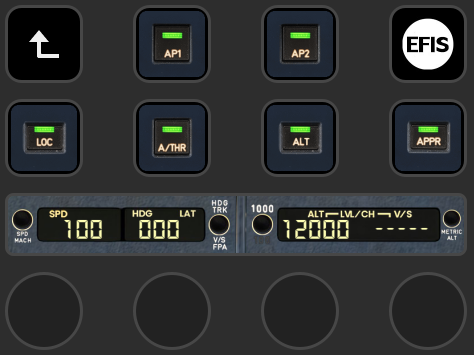
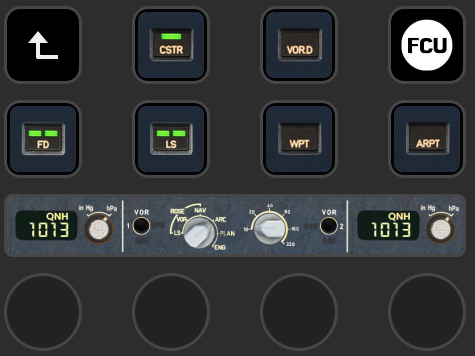
Each page can be navigated using buttons or by swiping left and right. (Order: EFIS - FCU - FWD - OVERHEAD - COM - CONF)
FCU Page
- Short push on the knob: PUSH
Long press (over 0.5 seconds): PULL - You can toggle each function by touching the round buttons on the Stream Deck display.
EFIS Page
- Short or Long press on the LS/VV switches toggles the CAPT or FO side.
- Switching between InHg and HPa can be done by touch.
- Touch for VOR1, VOR2 switches.
- Push the Knob for STD and QNH transition
FWD Page
- WX radar Switch : The PWS selection uses a short toggle, while the SYSTEM selection requires a long toggle (over 0.5 seconds).
- Touching IDENT button activates Ident function.
- Transponder selector can be swiched by pressing knob alternatively
- Autobrake Selector can be selected by rotating knob, push to toggle and ECAM knob is working as same.
OVERHEAD Page
Due to MSFS limitations, wiper switches were excluded since wipers do not affect raindrops on the windshield or visibility.
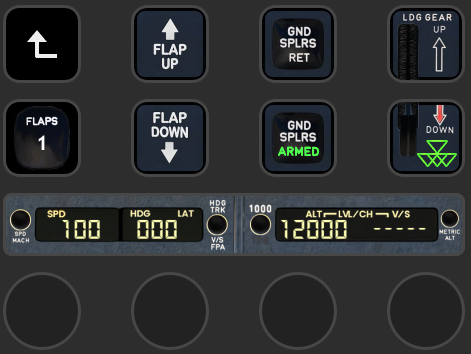
CONFIG Page
The config page allows you to set the flaps, landing gear, and speed brakes while controlling the FCU during the approach phase.
- Pressing and holding the FLAP UP switch fully retracts the flaps, while pressing and holding the DOWN switch sets the flaps to FULL.
COM Page
This page is allows easy navigation to other pages.
Known Bugs
Update Notes
v1.0 Initial release
If you have any features you'd like to add or if you find any errors or bugs, please leave a comment. I will check and work on them as time allows
Your sincerely, Tony👨🏻✈️
'-=FlightSim=- > ---Add-Ons' 카테고리의 다른 글
| [SD+]iniBuilds A350_Tonyviation Profile (0) | 2025.04.20 |
|---|---|
| [SD+]FENIX A32X_Tonyviation Profile (0) | 2025.04.07 |
| [SD+]iFly 737MAX_Tonyviation Profile (0) | 2025.03.25 |
| [SD+]PMDG 777_Tonyviation Profile (0) | 2025.03.10 |
| [SD+]PMDG 737_Tonyviation Profile (0) | 2025.02.21 |